Thinking in Compose
Thinking in Compose
https://www.youtube.com/watch?v=SMOhl9RK0BA&feature=emb_imp_woyt&ab_channel=AndroidDevelopers
Compose는 완전히 코틀린으로 작성되었으며, 코틀린 언어의 스타일과 인간공학을 수용한다.
기존 뷰 시스템과의 상호 운용이 가능하며 기본 플랫폼에서 번들로 제공되지 않는 전적으로 사용자 공간에서 빌드되므로 원하는 시간에 기능 개선 및 버그 수정을 활용할 수 있습니다. (It allows for interop with the existing view system, and it’s build entirely in user space, unbundled from the underlying platform, which means you can take advantage of feature improvements and bug fixes on your own time)
1.Composition
Composable 함수는 보기에는 보통의 함수 같지만, 몇가지 중요한 차이점이 있음
@Composable Functions can re-compose
- Composable functions might be called again in order to update the state of the UI
- The Compose runtime might re-execute the Composable function after they’ve been called the first time in order to to update the current state of the UI
- 우리는 이러한 프로세스를 recomposition 이라고 부름
사용자의 프로필을 만들때, 테두리에 랜덤으로 색깔을 넣어주는 함수가 존재, 이 함수는 composable 함수가 재 실행될때마 색깔이 변경될 것임
이러한 상황을 방지해 줄 수 있는 것이 있음
@Composable Functions have a memory
-
Composable 함수는 마지막으로 호출된 항목에 접근 할 수 있음
-
remember의 primitive function
@Composble fun <T> remember(
  vararg inputs: Any?, // 로컬 캐시의 key라고 생각할 수 있음
  calculation: () -> T
): T
val ringColot = remember { randomColor() }-> 반환값이 바뀌는 것이 아니 함수의 첫번째 결과를 기억할것을 명시
영상속의 예제 채팅 앱에서는 일반 텍스트만 뿐만아니라 클릭할수 있는 링크와 코드 블럭도 있음
그러므로 Text() 를 커스텀 텍스트 컴포넌트인 ChatText() 로 구현
// 1
@Composable fun ChatText(text: String) {
  Text(text, style = typography.body1)
}
Compose 에서는 text Composable의 두가지 오버로드를 제공함
@Composable fun Text(text: String,  ...)
@Composable fun Text(text: AnnotatedString, ...)
text를 -> AnnotatedString으로 변환하는 함수를 만듦 fun parseAnnotated()
// 2
@Composable fun ChatText(text: String) {
  val annotated = parseAnnotated(text)
  Text(annotated, style = typography.body1)
}
parseAnnotated 호출은 expensive할 수 있음, chatText는 composable 이므로 re-compose될 수 있음
-> remember 함수를 사용
이 케이스에서는, remember의 첫번째 파라미터를 사용할 것
// 3
@Composable fun ChatText(text: String) {
  val annotated = remember(text) parseAnnotated(text) // 텍스트가 변경 될 때에만 다시 계산
  Text(annotated, style = typography.body1)
}
@Composable functions can be composed
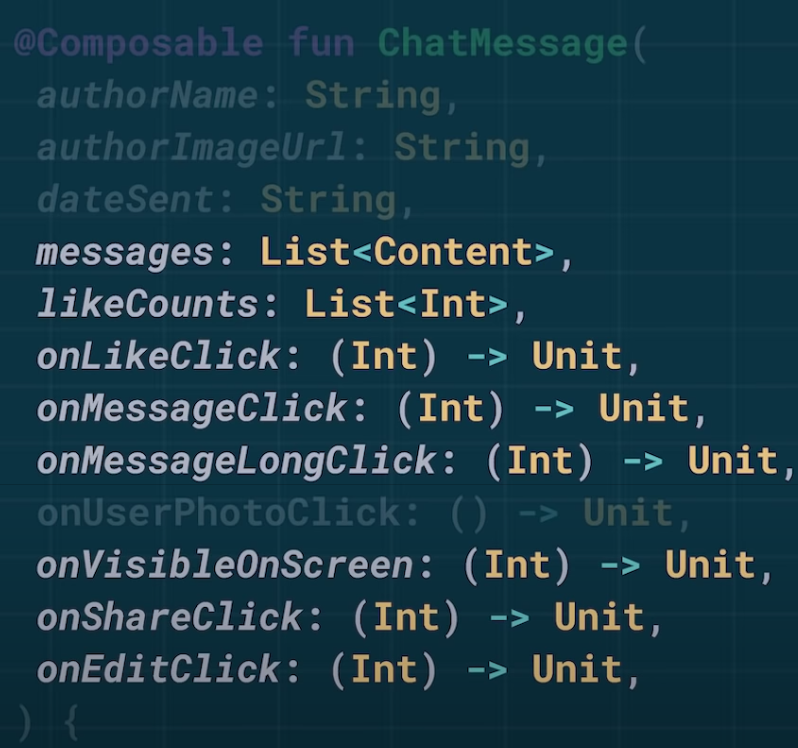
다음과 같이 많은 일을 하고 있는 함수에서 메시지의 컨텐츠와 관련있는 부분만 뽑아낼 수 있다. 이 모든 파라미터들을 하나의 Composable content lambda로 뺄 수 있다.
@Composable fun ChatMessage(
  authorName: String,
  authorImageUrl: String,
  dateSent: String,
  onUserPhotoClick: () -> Unit,
  content: @Composable () -> Unit, // !!여기가 핵심
  )
ChatMessage composable을 단순, 그리고 유연하게 만든다.
2.State
채팅 앱에 있는 send message bar를 구현
Compose는 material design components 에 대한 full implementation을 제공한다.
-> 구현을 위해 Material TextFields를 보면 채팅 앱에서 필요한 것과 조금 다르다.
이 컴포넌트를 조정해서 사용할 수 도 있지만, 권장하지 않음
Compose는 MDC 에서 사용자 인터페이스를 만들기 위해 많은 유용한 core primitives을 제공한다.
여기에서는 그중 하나인 TextField()를 사용한다
// 1
@Composable fun JetChat() {
  TextField(
      value = "Hello",
      onValueChanged = { }
  )
}
위 코드에서는 텍스트 필드에 값을 입력해도 변경되지 않는다.
value 는 initial value이기 때문
텍스트 필드가 다이내믹한 값을 보여주기 위해서는 state에 대해 알아야 한다.
// 2
@Composable fun JetChat() {
  // return mutableStateOf String
  var text by remember { mutableStateOf("") }
  TextField(
      value = "Hello",
      onValueChanged = { }
  )
}
// T타입의 value를 받아 value로 초기화 된 해당 타입의 mutable State instance를 환하는 함수
fun <T> mutableStateOf(value: T): mutableState<T>

interface mutableState<T>: State<T> {
  var value: T
}
MutableStae to type with a writable value property of type T. 여기에서 핵심은 value 프로퍼티가 쓰여지면, 이를 subsribe 하고 있는 Composable 함수들의 recomposition을 예약한다는것이다.
interface State<T> {
  val value: T
}
And a Composable function get subsribed to state instance any time the value property is read during its execution.(??)
그리고 state instance를 subsribe하는 Composable 함수
inline operator fun <T> State<T>.getValue(...): T
inline operator fun <T> MutableState<T>.setValue(...)
property delegate에서 코틀린에서는 로컬 변수의 getting과 setting에 다른 의미를 줄 수 있다, getValue와 setValue 오퍼레이터 함수를 정의 함으로써
그러므로 해당 코드를 de-sugar하면 다음과 같
// de-sugar
@Composable fun JetChat() {
  var text = remember { mutableStateOf("") }
  TextField(
      value = text.getValue(),
      onValueChanged = { text.setValue(it) }
  )
}
그리고 state와 함께, getValue와 setValue는 단지 value 프로퍼티의 getter와 setter 이므로
value property를 사용하는 것처럼 text.value 사용
// de-sugar
@Composable fun JetChat() {
  var text = remember { mutableStateOf("") }
  TextField(
      value = text.value,
      onValueChanged = { text.valeu = it }
  )
}
And so, “by” 키워드로 state를 사용하는것은 단지 state object vlaue를 value 그 자체로 다루는 것과 동일하다는것을 볼 수 있다.
// 2
@Composable fun JetChat() {
  var text by remember { mutableStateOf("") }
  TextField(
      value = text,
      onValueChanged = { text = it }
  )
}
3. Architecture
Put state in lowest common ancestor of tis consumers As a rule of thumb, we want to put state in the lowest part of the tree where it’s still accessible to all of the thing that need it, but no lower than that.
State should have a Single Source of Truth want to have a single source of truth for all states. We never want to have to synchronize two states that are meant to represent the same thing.
결과적으로, SendMessageBar 는 text와 mode state를 가짐
사용자가 send 버튼을 클릭하면 ChatViewModel의 send 함수를 호출
Seperation of Concerns?
몇 composable 함수가 많은 로직을 가지고 있는 것을 볼 수 있음. 그리고, 관심사의 분리 정신을 고수하는지 여부를 묻는것은 reasonable 하다.
관심사의 분리는 때때로 coupling과 cohesion(응집성)을 제외한 측면에서 정의된다. (sometimes seperation of concerns defined in terms of coupling and cohesion.)
관심사의 분리는 가능한 관련된 많은 코드를 그룹화하고 결합이 최소화 될 수 있도록 분리 하는 것으로 생각할 수 있다.
좀더 익숙한 것으로 구성해보자면 layout xml을 가지고 있고, 대응하는 activity 파일이 있음 이 케이스에서 액티비티는 레이아웃을 inflate하고 사용자 intercation을 핸들링함
이때 커플링이 생기게 된다. 액티비티는 레이아웃에 대해 알아야함 (ex. findViewById, view.getChildAt(0))
액티비티가 커질수록 이러한 커플링도 커지게됨 좋은 예제에 따라, UI로직을 activity에서 최대한 분리시킴
그리고 뷰 모델에서 이러한 유형의 데이터 바인딩을 대신 처리할 수 있다.
이는 실제로 coupling을 없애는 것은 아니며, viewmodel에 옮기는 것 뿐임
오늘에서, 뷰 모델의 책임은 본직적으로 레이아웃과 관련이 있으며, 뷰 모델은 레이아웃에 대한 정보를 반드시 가지고 있어야 함 다른말로하면, 그들은 tightly coupled됨
Language created a forced seperation.
여기서 근본적인 문제 중 하나는, UI 관련된 코드와 레이아웃을 정의하는 코드가 다른 언어로 정의된다는 것이다. 그리고 이것은 강제적인 분리선을 만들었다. 그리고 서로 다른 언어로 되어있기때문에, 암시적인 coupling으로 이어지게 됨.
UI의 구조를 정의할 동일한 언어로 하게되면 이러한 의존들이 적어도 좀더 명확해진다.
이렇게 하면, 이제 Kotlin의 강력한 모든 기능을 가지고 가장 와닿는(이해하기 쉬은) 분리선을 그리게됨 이는 몇가지 highy-coupled된 로직이 리팩토링 혹은 옮겨질 수 있으며 결과적으로 우리의 코드는 less coupling 그리고 more cohesion될 수 있다.
그러면 실제 코드에서 어떻게 동작할 수 있는지를 살펴보면,
fun bind(liveMsgs: LiveData<List<Message>>) {
  liveMsgs.observe(this) { msgs ->
    updateChatBubbles(msgs)
  }
}
자주 볼 수 있는 typical한 코드임. Compose에서의 상황도 유사하지만, 더욱 간단함
@Composable fun ChatScreen(liveMsgs :LiveData<List<Message>>) {
  // observeAsState를 활용
  val msgs by liveMsgs.observeAsState()
  Column {
    for (msg in msgs) {
      ChatMessage(msg)
    }
  }
}
observeAsState는 liveData의 extension method
@Composable fun <T> LiveData<T>.observeAsState(): State<T>
Because Composable functions have a lifecycle and the ability to re-compose, the Composable function itself can act as both the lifecycle owner and the funcion to execute whenever the data changes. (Composable 함수에는 수명주기와 재구성 기능이 있으므로 Composable 함수 자체는 데이터가 변경 될 때마다 실행되는 수명주기 소유자 및 함수 역할을 모두 수행 할 수 있습니다.) 그래서 두개다 명시할 필요없음.
또는 ViewModel을 ChatScreen에 넘기고 messages에 접근 할 수 있음
-> Composable 함수가 scpoe를 내포하고있기때문에, 뷰모델을 파라미터로 넘기는 대신에 view model 인스턴스를 Compose가 제공하는 viewModel 함수를 통해 얻어올 수 있다.
// 내부에서는 viewModel 프로바이더를 활용
val chatVm = viewModel<ChatViewModel>()
val msgs by chatVm.messages.observeAsState()
메시지를 보여줄때, 일부만 보여주면 되는데 모든 메시지를 compose하는 것은 expensive 할 수 있음
이를 위해 recycler view를 사용했으며, compose에도 유사 컨셉을 가진 LazyColumn이 존재
예시로 들은 chatScreen앱은 chatList 뿐만 아니라 top, bottom bar등이 존재. Compose는 또한 Scaffold Composable을 제공, top-level 화면의 common structure을 셋업하는데 유용
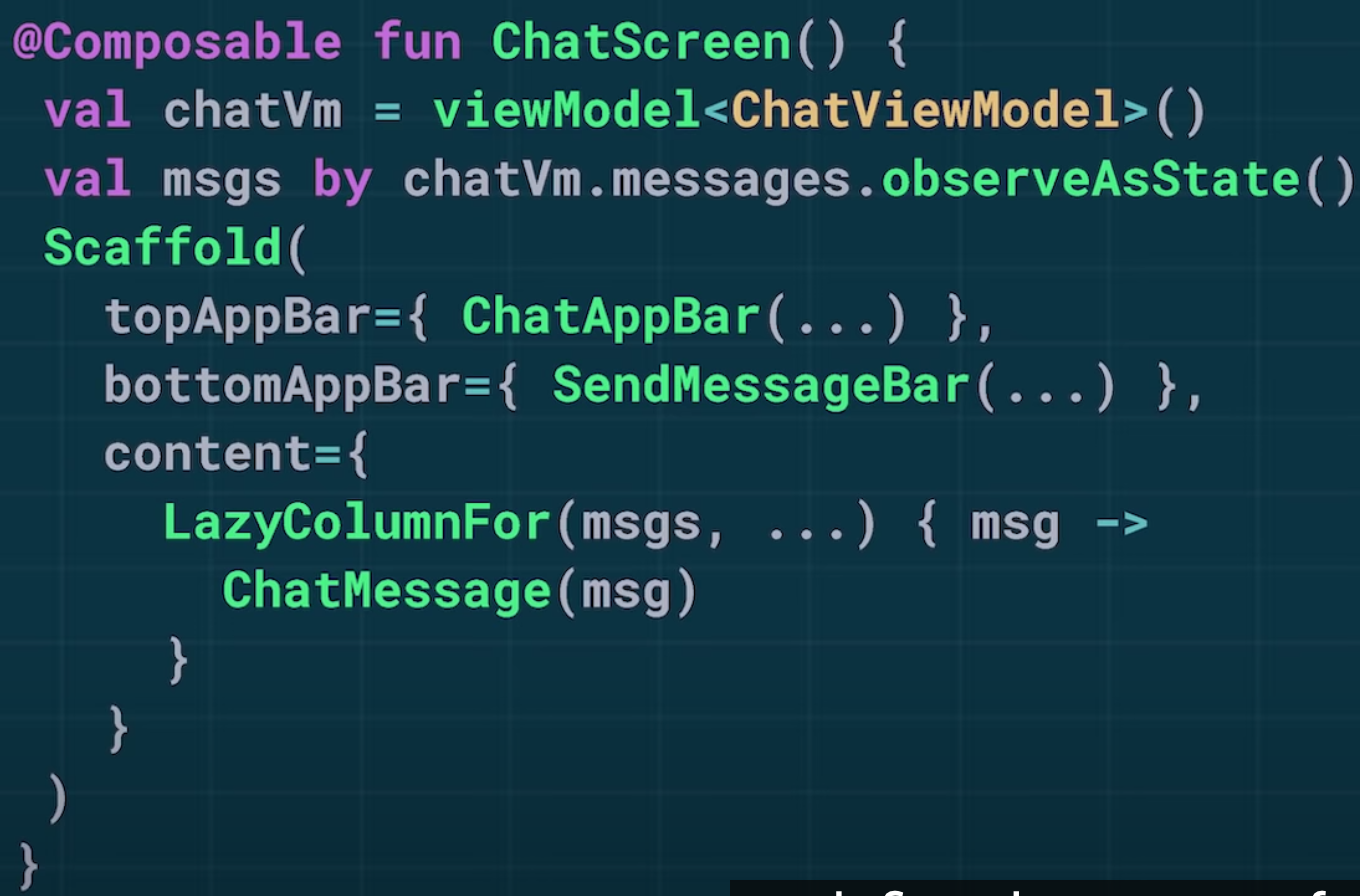
Composable 함수들을 Compose 툴킷 내 일부로 보는게 아니라 추가적인 Kotlin Language로 봐주었으면 좋겠다.